
Stop wondering what you spent today.
One dot tells you.
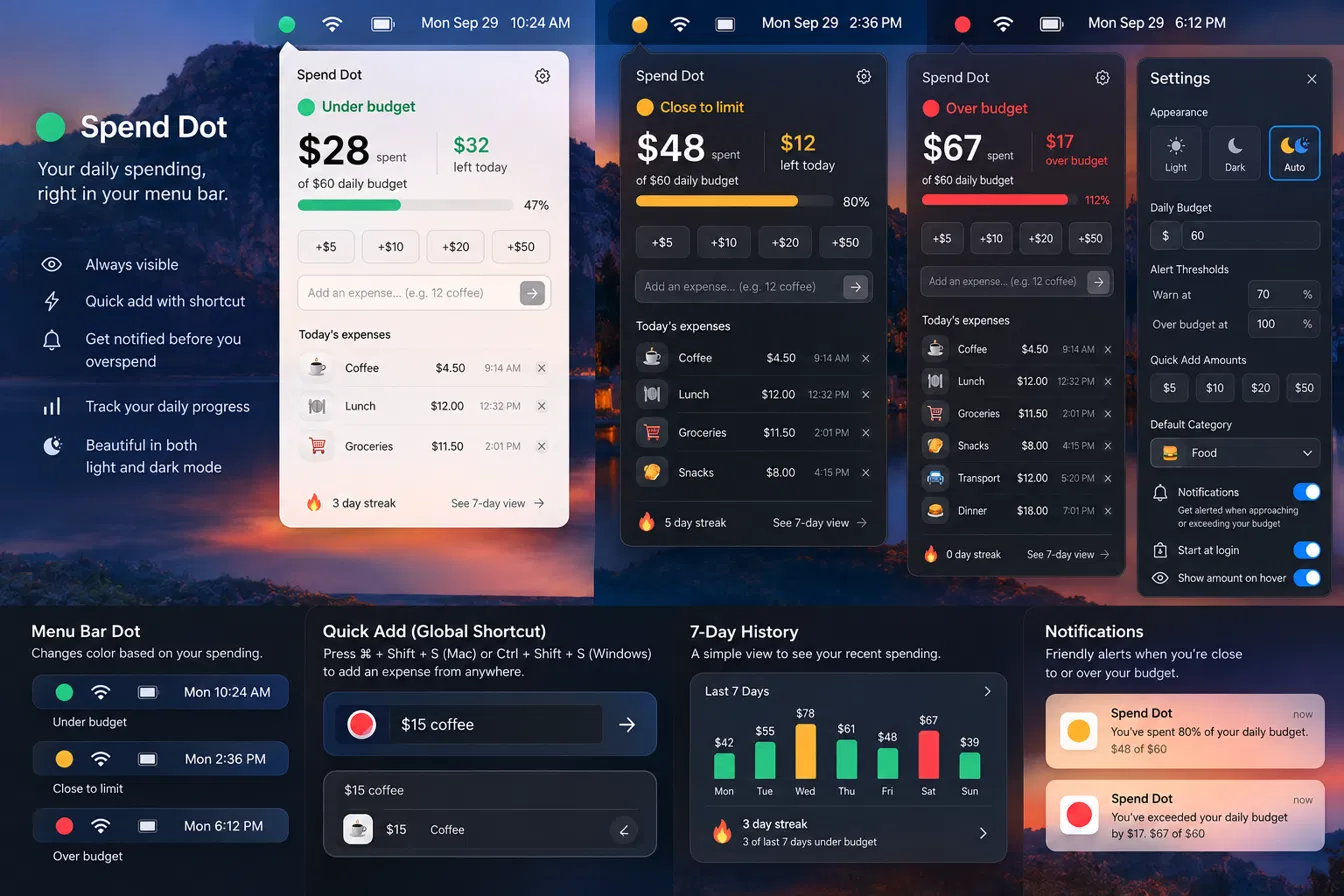
Green means you're fine. Amber means slow down. Red means stop. That's the whole idea — try it below, it's live.
↑ pulled straight from the real Spendot source code — when the app updates, this updates too
Small app. One job. Does it well.
Always visible
No app to open. The dot sits in your menu bar all day, quietly telling you where you stand.
One-tap add
Quick-add buttons for your common amounts, or type an exact figure with a label in seconds.
Green, amber, red
The color tells the whole story before you even read a number. Set your own alert threshold.
7-day view
See the last week at a glance and how many days you finished under budget.
Streaks
Stay under budget and watch your streak build — a small nudge to keep the habit going.
100% local
No account, no server, no bank connection. Every number stays on your machine.
Coming soon
Spendot v1 is deliberately small. These are next on the list.
⌘⇧S global shortcut
Add an expense from anywhere on your Mac or PC without opening the popover first.
Native notifications
A gentle system alert when you cross your warning threshold or your daily budget.
iPhone companion
Log an expense from your phone, synced back to your desktop dot.
Frequently asked
What exactly does Spendot do?
It's a single dot in your menu bar that changes color based on how much you've spent today versus your daily budget: green when you're fine, amber when you're close, red when you're over. Click it to add or remove expenses and see today's list.
Does it connect to my bank?
No. Spendot never connects to a bank account or card. You add expenses manually — it takes about two seconds per entry, and there's nothing for a bank API to expose or charge you for.
Is my data private?
Yes. Everything is stored locally on your own computer. Nothing is sent to a server, because there is no server — Spendot doesn't have one.
Does it work on both Mac and Windows?
Yes, the same $4.99 purchase covers both. There's also a separate native Mac-only build in development for people who want the leanest possible version.
Is this a subscription?
No. $4.99 once. No recurring charge, no account required.
What if I want a refund?
Reach out through the payment provider's support within 14 days of purchase and we'll sort it out.
One price. Yours forever.
- No subscription, ever
- Free updates within v1.x
- Works on macOS and Windows
Secure checkout via Razorpay.
Stop guessing what you spent today.
One dot. One glance. $4.99, once.
Get Spendot — $4.99